BAM Registry Key: Where It Is and How to Collect It
The exact BAM and DAM registry paths per Windows build, why CurrentControlSet doesn't exist offline, and how to acquire SYSTEM with its transaction logs.
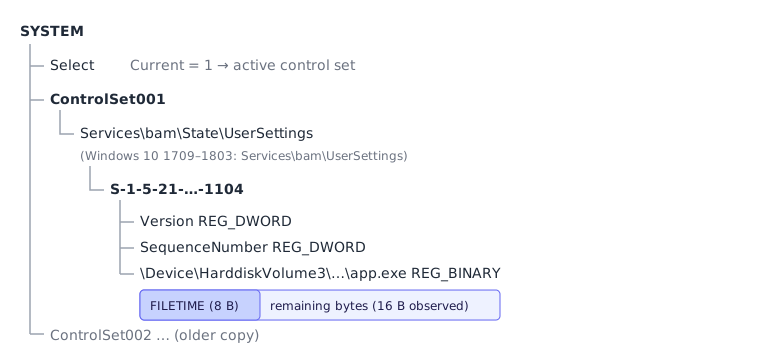
TL;DR. BAM lives in the SYSTEM hive at ControlSet00X\Services\bam\State\UserSettings\<SID> (Windows 10 1809+ and 11) or ControlSet00X\Services\bam\UserSettings\<SID> (1709–1803). DAM mirrors it under Services\dam. Offline there is no CurrentControlSet: read Select\Current. Collect SYSTEM with SYSTEM.LOG1 and SYSTEM.LOG2, and grab SOFTWARE to turn SIDs into names.
The key is easy to find in regedit on a live box. The mistakes happen offline: reading the wrong control set, parsing a hive copied without its logs, or copying a locked file that comes back as zeros. This article covers the paths and the acquisition options. For what's inside each value, see the BAM value format; for the bigger picture, the BAM/DAM forensics guide.
The registry paths
On a running system, through the HKEY_LOCAL_MACHINE view:
HKLM\SYSTEM\CurrentControlSet\Services\bam\State\UserSettings\<SID>    (Windows 10 1809+, Windows 11)
HKLM\SYSTEM\CurrentControlSet\Services\bam\UserSettings\<SID>          (Windows 10 1709–1803)
HKLM\SYSTEM\CurrentControlSet\Services\dam\State\UserSettings\<SID>    (DAM, Modern Standby devices)
The switch to the State subkey with 1809 is documented in kacos2000's BAM notes: the older bam\UserSettings key stops being updated but "old entries may still be found there". A host upgraded from 1803 can therefore have both keys, and the legacy one is a small time capsule from before the upgrade. The Windows versions article covers that case.
Each <SID> subkey holds one value per executable, plus the bookkeeping values Version and SequenceNumber. The SID is the account the moderator attributed the process to; see BAM user attribution.
The hive file on disk
HKLM\SYSTEM is backed by C:\Windows\System32\config\SYSTEM, as listed in Microsoft's registry hives reference. Next to it sit the transaction logs SYSTEM.LOG1 and SYSTEM.LOG2 (registry files).
Don't count on C:\Windows\System32\config\RegBack for an older copy: since Windows 10 1803, Windows no longer backs the hives up there by default (Microsoft Learn). Volume Shadow Copies are the better source of historical SYSTEM hives.
CurrentControlSet does not exist offline
CurrentControlSet is a link that the kernel builds at boot. In a hive file you only have ControlSet001, often ControlSet002, and a Select key:
Value under Select | Meaning |
|---|---|
Current | The control set that was in use (usually 1) |
LastKnownGood | The set kept as last known good |
Default | The set to use at next boot |
A correct offline parser reads Select\Current and treats that set as "current". The other set is usually an older copy: in the fictional sample hive on this site, ControlSet002 holds a snapshot of the user's BAM entries before the intrusion, which is useful for comparison but misleading if you mix it into the current timeline. The BAM/DAM Parser reads every ControlSet00X, marks rows from the active one, and shows only those by default ("Active control set only").
Acquiring the SYSTEM hive
The hive is locked while Windows runs; Explorer or copy will fail. Options, from lightest to heaviest:
| Method | Command / target | Gets logs? | Notes |
|---|---|---|---|
reg save | reg save HKLM\SYSTEM C:\triage\SYSTEM.hiv | No (writes a consolidated hive) | Built in; needs admin (Microsoft Learn). Changes the host slightly. |
| KAPE | RegistryHivesSystem target, or the !SANS_Triage compound | Yes | Raw NTFS copy; target definitions in KapeFiles |
| Velociraptor | Windows.Triage.Targets collection with the RegistryHivesSystem target (formerly Windows.KapeFiles.Targets on older releases), or Windows.Forensics.Bam for a live parse | Yes (file collection) | Bam artifact docs |
| FTK Imager | Add evidence → physical/logical drive → export config\SYSTEM* | Yes | Or "Obtain protected files" |
| Disk image | Mount the image, copy Windows\System32\config\SYSTEM* | Yes | Best for chain of custody; see Disk Image Parser |
| Volume Shadow Copy | vssadmin list shadows, then copy from the shadow device | Yes | Older SYSTEM hives = older BAM entries (vssadmin) |
Whatever you use, also take C:\Windows\System32\config\SOFTWARE (and its logs): its ProfileList key maps SIDs to profile folders. The KAPE RegistryHivesSystem target already includes it.
The all-zeros trap
A hive copied from a live system with a plain file copy (or some backup agents) can come back as a file of the right size filled with zeros. Our parser detects that and explains the skip ("all zeros — the hive was probably locked when copied"). Re-collect with a raw-copy tool.
Dirty hives and transaction logs
Windows writes registry changes to SYSTEM.LOG1/SYSTEM.LOG2 first and merges them into the primary file later. A hive whose two base-block sequence numbers differ is dirty: it has pending writes that only exist in the logs (libregf format notes, msuhanov/regf specification). For BAM, which is updated constantly, those pending writes are often the most recent executions — exactly the ones you want.
What to do:
- Always collect
SYSTEM.LOG1andSYSTEM.LOG2with the hive. - Check whether the hive is dirty. The BAM/DAM Parser shows a warning banner when the sequence numbers differ.
- If it is, replay the logs with Eric Zimmerman's
rla.exeor let Registry Explorer do it, and parse the cleaned hive.
Our tool does not replay logs yet; it tells you when you need to. A reg save export is already consolidated, so it will not be dirty.
Reading it on a live system
For a quick look during triage, without collecting anything:
Get-ChildItem 'HKLM:\SYSTEM\CurrentControlSet\Services\bam\State\UserSettings' |
  ForEach-Object { $_.PSChildName }
That lists the SIDs. The values themselves are binary FILETIMEs, so a raw dump isn't readable; export the hive and parse it, or run Velociraptor's Windows.Forensics.Bam artifact which decodes them and resolves user names. Remember that programs you start on the live host can themselves end up in BAM under your account — note them in your case log.
Checklist
- Paths:
bam\State\UserSettings(1809+),bam\UserSettings(1709–1803),dam\State\UserSettings(DAM). - Offline: resolve
Select\Current; don't mix control sets. - Collect
SYSTEM+SYSTEM.LOG1+SYSTEM.LOG2+SOFTWARE. - Check for a dirty hive; replay before parsing.
- Look in Volume Shadow Copies for older BAM snapshots.
Then drop everything onto the BAM/DAM Parser, or follow how to analyze BAM and DAM. Other artifacts in the same hive, such as ShimCache, are covered on ShimCache Parser and Registry Parser.
Frequently asked questions
Where is the BAM registry key?
In the SYSTEM hive: ControlSet00X\Services\bam\State\UserSettings\<SID> on Windows 10 1809+ and Windows 11, and ControlSet00X\Services\bam\UserSettings\<SID> on Windows 10 1709 to 1803.
Can I copy the SYSTEM hive with Explorer on a live system?
No. The hive is locked by the kernel while Windows runs. Use reg save, a raw NTFS copy tool such as KAPE or FTK Imager, Velociraptor, or a Volume Shadow Copy.